
Digital Marketing Checklist
Hit the ground running this in 2026
We Do Websites
2026 Digital Marketing Checklist
Foundations & Goals >
Set goals, identify what success looks like & give yourself focus for your marketing year ahead
1. Set one primary marketing goal
Keep it simple. One number & one deadline.
The number of enquiries / sales you want to recieve per month.
When do you want to start hitting this target.
2. Define what a ‘qualified lead’ is
Understand what makes them the right customer for you?
Are they the right size, with a budget to cover your service and do they need it quickly?
3. Choose 1 core offer
Choose one simple offer to get people interested & get them enquiring.
A FREE session or a simple package.
4. Set your marketing frequency
Set how often you are going to take marketing action.
i.e. Each month we will post 1 blog, post on social media 4 times & request 4 reviews.
Keyword Research >
It is essential to know what people are searching for when it comes to your product or service. This will inform everything you write going forward
5. Do keyword research
Use keyword tools and Google search suggestions to uncover the terms your target customers actually type into Google.
i.e. Florist, Flowers, Wedding Flowers, Wedding Bouquet etc..
6. Identify local keywords versions
Add “near me & the locations of where your customers are to your main keywords.
i.e. Florists near me”, Florists harpenden, Florists St Albans, Florists Hertfordshire etc…
7. Identify high intent keywords
Add intent terms to your main keywords as these people are closer to taking action.
i.e. Buy flowers, Send flowers etc…
8. Create a definitive list of keywords & share it
Refine all your keywords into one list & make sure everyone has a copy. Staff writing content for website, replying to reviews, outsourced social media companies etc…
9. Allocate 1 keyword for each website page
To give your content focus on your website & improve your conversion rate & organic rankings you need to allocate one keyword to each page on your website
Google Business Profile (GBP) setup >
10. Claim and verify your Google Business Profile.
Search your business on Google/Maps → ensure you have ownership access.
11. Check NAP consistency (Name, Address, Phone) across web listings.
Compare GBP, website footer, directories, socials for exact match.
12. Select correct primary + secondary categories.
Use the most specific primary category; add supporting secondary categories.
13. Update opening hours + special hours (holidays).
Confirm for upcoming bank holidays / seasonal hours.
14. Add services/products with descriptions and pricing (if appropriate).
Populate core services and key details that customers ask about.
15. Add high-quality photos (team, work, premises, products).
Aim for 15–30 photos; add new photos monthly.
16. Enable and monitor GBP messages (if suitable).
Respond within 24 hours; set auto-reply and FAQs.
17. Seed and answer GBP Q&A.
Add 5–10 common questions; answer them clearly.
18. Post GBP updates 1–2x per month.
Use offers, updates, before/after, seasonal tips.
Reviews & Reputation >
19. Ask for reviews (constantly)
Setup when you ask, who asks & how.
i.e. Strive for 3/month. Use email/WhatsApp/in-person prompts.
20. Make a Google review link
Inside Google Business Profile Manager click on “Ask for reviews”. This gives you a direct link.
21. Respond to all reviews
Always including a relevant keyword thank positives while addressing any negatives calmly and offer resolution.
22. Show reviews on the website
Add a widget to your websiteto show your reviews.
Bonus: include reviews in schema if possible.
23. Collect 3–5 strong testimonials
Ask for testimonials, written, audio or video.
Best time: right after delivering a result.
Website Conversion Essentials >
24. Homepage clearly states what you do, for who, and the outcome
Above the fold (the content visible before a user scrolls), clearly communicate your service, who it’s for, and the main benefit or result.
25. Clear Call To Actions (CTAs) on every page
Ensure a clear CTA is visible on both desktop and mobile, without requiring excessive scrolling. Include several CTAs throughout the page where necessary.
26. Contact details visible on every page
Display phone number, email, and service area clearly. Ensure these are clicklable links to allow for tracking link clicks.
27. Short easy forms
Test every form submission to ensure spam protection, email delivery, and user notifications are working correctly.
28. Individual pages for each service / product
Create one dedicated page per service instead of listing everything on a single page.
29. Add credability / social proof to each page
Include reviews, accreditations, case studies, guarantees, or trust badges to build confidence.
30. Add FAQs
Include frequently asked questions to address common concerns and remove barriers to enquiry.
31. Write unique meta titles & meta descriptions for each page
Create clear, unique meta titles and descriptions so search engines and users understand each page. Include CTAs in meta descriptions and limit to approx. 165 characters.
32. Use logical headings (H1, H2, H3)
Think of headings as a relevancy hierarchy. The more important and relevant the topic is to the page, the higher the heading level it should have (H1 being the most important). Only one H1 should be used per page.
33. Add internal links
Link between relevant pages naturally within your page copy to help users navigate your site and help search engines crawl it.
34. Create a Secondary Call To Action (a checklist/guide to capture emails.)
Offer a checklist or guide to capture emails from visitors who are not ready to enquire yet.
SEO Basics (2026) >
35. Set up Google Search Console
Connect your website to Google Search Console so you can monitor search performance and any technical issues.
36. Submit sitemap & check your site index
Submit your sitemap URL (for example, yourwebsite.co.uk/sitemap.xml) in Google Search Console and confirm Google is indexing your most important pages correctly.
37. Track SEO Progress
Monitor rankings, impressions, and clicks using tools such as Google Analytics 4 (GA4), Google Search Console, Moz, or SEMrush to see how your SEO is improving over time.
38. Create a simple content plan (1 useful piece/month).
Answer FAQs, comparisons, costs, processes, local guides.
Tracking & Measurement (GA4) >
GA4 installed correctly on every page.
Expand
Check in GA4 Realtime; verify tags across site.
Track key conversions (forms, calls, bookings).
Expand
Use events + conversion settings; test end-to-end.
Use UTMs consistently for campaigns.
Expand
Email, social, paid ads: source/medium/campaign naming rules.
Confirm cookie banner doesn’t block all analytics by mistake.
Expand
Test consent mode; verify tracking post-consent.
Call tracking set up (if phone is important).
Expand
Unique number per channel or dynamic number insertion.
Create one simple monthly dashboard/report.
Expand
Leads, conversion rate, cost per lead, top pages, top channels.
Track lead quality (not just lead volume).
Expand
Add a simple ‘qualified?’ field in CRM/sheet.
Paid Ads Readiness >
Have landing pages for paid traffic (not just homepage).
Expand
Message match: ad → page → CTA; add proof near CTA.
Conversion tracking verified with a test lead.
Expand
Submit a test form/call and confirm attribution.
Know your target CPL/CPA and assumptions.
Expand
Back-calculate from average order value and close rate.
Have a negative keyword strategy (Search).
Expand
Exclude irrelevant queries; review search terms regularly.
Brand protection (if competitors bid on your name).
Expand
Run brand search campaign if needed.
Remarketing audiences set up (where consent allows).
Expand
Site visitors, engaged users, video viewers.
Test one variable at a time.
Expand
Offer vs audience vs creative vs landing page.
Content & Social (Sustainable) >
Pick 1–2 platforms you can be consistent on.
Expand
LinkedIn/Instagram/Facebook—choose based on audience.
Define 3–5 content pillars.
Expand
Proof, education, behind-the-scenes, FAQs, opinions.
Share proof weekly (reviews, case studies, wins).
Expand
Turn 1 win into multiple posts.
Capture content while doing work.
Expand
Photos/videos during delivery (with permission).
Use a clear CTA at least weekly.
Expand
DM, book, download, enquire, call.
Repurpose long-form into shorts/carousels.
Expand
One blog/video → 3–6 social pieces.
Email Marketing & Nurture >
Capture emails with a relevant lead magnet.
Expand
Checklist/worksheet/quote guide; simple form with clear value.
Send an instant auto-response to new leads.
Expand
Confirm receipt + what happens next + time expectation.
Build a 3–5 email nurture sequence.
Expand
Problem → solution → proof → FAQ → CTA.
Send at least one helpful email per month.
Expand
Tips, stories, FAQs, seasonal prompts.
Segment customers vs prospects.
Expand
Different messages and offers.
Track replies and bookings from email.
Expand
Use UTMs + a ‘How did you hear about us?’ field.
Speed-to-lead & Sales Process >
Respond to new enquiries within 1 business day (ideally <1 hour).
Expand
Set alerts, shared inbox, or call handling.
Log every lead in a simple pipeline.
Expand
New → contacted → quoted → won/lost.
Use a first-response template that qualifies.
Expand
Ask 3–5 key questions and suggest next step.
Track missed calls and call back quickly.
Expand
Use missed call notifications or call tracking logs.
Ask every lead: ‘How did you hear about us?’
Expand
Keep a dropdown list for reporting.
Compliance & Security (UK) >
SSL active (https) and site is secure.
Expand
Check padlock in browser; fix mixed content warnings.
Privacy policy + cookie policy up to date.
Expand
Ensure GDPR/UK compliance and accurate tracking disclosures.
Forms have spam protection and deliverability tested.
Expand
reCAPTCHA/turnstile; check spam folders and SPF/DKIM if needed.
Website and plugins updated regularly.
Expand
Patch schedule + backups.
Backups running and tested.
Expand
Confirm restore process works.
The Frustrations Holding Your Business Back
Feeling Invisible Online
You’ve built a great business but when potential customers search online, they find your competitors instead of you. Whether you’ve tried marketing before and just wasted money, or you’re not sure where to start, watching others get the customers that should be yours is frustrating.
Uncertainty About Where to Begin
Online marketing is very complex and can feel overwhelming. There are so many platforms, strategies, and conflicting advice that it’s hard to know what’s right for your business. This uncertainty causes inaction or low commitment that rarely delivering the desired results.
Wasting Money on poor Marketing
For those who have tried marketing before, there’s nothing more discouraging than investing your money into campaigns that doesn’t bring any customers. Each disappointing result makes it harder to justify trying again, even though you know online visibility is essential for growth.
Now Imagine These Achievable Goals For Your Business
Being Found When Customers Are Looking
Imagine customers finding your business when they need your service. They search for services like yours, and there you are, at the top of Google, not buried on page ten. This is as simple as connecting with the customers when they need you.
Growing at a Pace That Works for You
Picture your business growing steadily, with a consistent flow of new customers at a pace you can manage. You control your marketing so you can stop overwhelming surges or disappointing droughts. Just predictable results that align with your growth targets.
Feeling Confident in Your Marketing Decisions
Envision running your business with the peace of mind that comes from knowing your marketing is working. No wondering if you’re wasting money. Instead, you get clear reports showing what’s working, what isn’t. We’ll even meet with you regularly to explain the results and together find the richest seams of gold within your marketing.
Our Digital Marketing Services
Strategic digital marketing services that deliver real results for small businesses. Each option below is designed to increase your visibility where it matters most and turn that visibility into growth for your business.
Web Design
Responsive wordpress website design that will look great and are easy for customers to navigate.
SEO
It’s not rocket science to rank high on Google organically. It just takes time & effort to insert the right words in the right places the right number of times, while making your SEO content read naturally.
Paid Marketing
Google ads allows you to instantly buy new traffic. We ensure that you are buying the right customers for the right price so you can make achieve your goals.
Tracking & Web Analytics
Google ads allows you to quickly buy new customers. The challenge is buying the right customers for the right price so you can still make a profit.
Social Media
Grow your brands awareness organically while building on your brands trust with social media will help deliver a higher return from all your marketing channels.
Here’s Your Clear Path to Growth
1.
It Starts with A Chat About Your Business
We start by listening to you. In a free, no pressure consultation, we’ll learn about your business, your customers, and your growth goals. This helps us understand exactly what you need – whether you’re new to marketing or have tried it before.

2.
Get a Simple, Practical Marketing Plan
Based on our conversation, we’ll create a straightforward marketing plan that makes sense for your business size and goals. We’ll explain everything in plain language, so you’ll know exactly what we’re doing and why it matters for your growth.

3.
Watch Your Business Grow
As your plan takes effect, you’ll start seeing more website visitors, more inquiries, and most importantly, more customers. We’ll provide regular, easy-to-understand reports so you can see exactly how your investment is paying off.
Ready for More Leads.
More Sales. Less Stress?
Struggling to get consistent enquiries? We’ve helped businesses just like yours drive more traffic, leads, and sales.
Case Studies
-
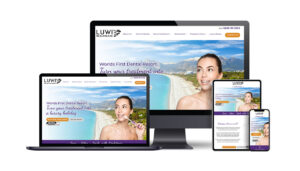
New website with great functionality
Luwi Health Care
Aydogan Unal
•
Dental Care
The Overview: The Luwi Health Care is a premier dental clinic with a presence in the UK and Turkey, specialising in providing dental tourism services. They tasked Click Return with a website design and…
-

Streamline and more functional website design and branding
Body Sculpting Clinic
Zal
•
Beauty Clinic
The Overview: The Body Sculpting Clinic is a Premium Non-invasive Beauty Clinic in London, providing an innovative approach to skin tightening and body sculpting treatments. They tasked Click Return with…
-

Facebook page reach improved by 46.8% vs the previous year
Cambridge Clear Beauty
Mr Ahmad
•
Plastic Surgeon
The Overview Cambridge Clear Beauty is led by an award-winning plastic surgeon, Tariq Ahmad. They help transform the lives of as many people as possible through a wide range of…
-

21% increase in sales 2021 – 2022
Chambers Timber
Dave Timbear
•
Timber Merchant
It was in the first few months of 2021 that we were approached by Chambers Timber – a family-run timber merchant servicing London. They had a website which wasn’t performing…
Testimonials / Reviews
-
“This team is just the best, i have worded with them for over 10 years, I would highly recommend them, don’t hesitant “

Dave Timbear
London
Timber Merchant
-
I dipped my toe in the water with Brad with the SEO of my previous website and later hired Click Return to also handle my Google Adwords. When I was ready to update my website they were the natural choice to create it. Brad advised on a WordPress template site that gave me the look I wanted but without the high costs of a bespoke site. I don’t think that anyone ever realises that it isn’t a bespoke site. I have had so many compliments from prospective clients about the website telling me that’s the reason they picked up the phone. I like to think some of that is the photographs of my work! However, I know it’s also to do with the way the site looks and functions. In it’s first year it brought a return that was many times my investment and it has done so every year since. The Click Return team have helped us learn to add to and change the website in house. This gives us control of the basic every day maintenance and means we only need to get the “big guns” in for the hard stuff. In regular phone/on-line meetings Brad advises and guides us with SEO and Adwords so things keep going the way that we need them to. Thanks Brad and Click Return.

Sam Coles
Leighton Buzzard
Lighting Designer
-
I am so grateful for everything that Click Return has achieved with regard to my website. Having attempted to do it myself, I have to admit it was a complete mess. From beginning to end I was impressed with their expertise and professionalism. Everyone on the team was approachable, helpful, and friendly, attributes that were vital for a novice such as me, resulting in a website that far exceeded my expectations. I would highly recommend the training programme. It has given me the confidence to experiment and add to the website whenever needed and their monthly statistics highlight areas that may need improvement and more focus. The difference it has made to my business is tremendous, it will always be a work in progress but I know that help if needed, is only a phone call away. Thank you so very much to everyone on the team.

Peggy Stephanou
Waltham Cross
Jewellery

Why Choose Click Return

Experience
We have been helping our clients achieve online success for 20 years through paid advertising, Search Engine Optimisation and creating new websites. Our efforts have helped our clients generate a combined conversion value of over £250 million so you can be reassured we know what we are doing!
Trust
We are driven by the success of our clients, and sit regular Google exams to maintain our Google Partner status, ensuring all clients generate a big return! Don't just take our word for it though, we have plenty of client testimonials on our website which we encourage you to see.
Our Promise
At Click Return we are passionate about good marketing and believe all clients should make money online. That's why we promise quality digital marketing services that will actually make you money. We are confident about upholding this promise and don't believe in tying any client down to long term contracts.
39. GA4 installed
Ensure Google Analytics 4 is installed correctly on your website and collecting data. 'Tag Assistant' extension on Chrome can quickly identify whether or not it is already installed or not.
40. Track key events (forms, calls, bookings)
Set up event tracking for important actions so you can measure enquiries and conversions accurately. Google Tag Manager allows you to create custom events such as Thank You Page Visits or Email/Phone clicks.
41. Monitor lead quality (which lead convert into business)
Add a simple 'qualified?' field in CRM/sheet.
42. Structure products / keywords into matching advert group
Group similar products or keywords together so ad copy, keywords and messaging are highly relevant to help increase Quality score ratings and lower cost-per-click.
43. Have specific landing pages for each advert groups
Send traffic to specialised landing pages that closely match the advert message to improve chances of success.
44. Check conversion tracking is working
Submit a test form/call via Tag Manager/Google Analytics debug.
45. Know your Target Cost Per Customer
Calculate this with the following formula:
Average order value - profit margin - costs = Target Cost Per Customer
i.e. £50 - £15 - £15 = £20 (Maximum Target Cost Per Customer )
46. Know your Target Cost Per Enquiry
This will let you know how much you can spend to get an enquiry.
Calculate this with the following formula:
Target Cost Per Customer x Conversion Rate = Maximum Target CPA
i.e. £20 x 25% = £5 (Maximum Target CPA)
47. Add negative keywords
Exclude irrelevant search terms across your campaigns to prevent wasted spend and improve traffic quality.
48. Remarket to website visitors
Show ads to people who have already visited your website to increase conversion chances. Commonly done via display ads.
49. Start Microsoft Ads
You can simply clone your Google Ads account into Microsoft and begin advertising on the 2nd most popular search engine.
50. Pick 1–2 platforms you can be consistent on
LinkedIn/Instagram/Facebook—choose based on audience.
51. Set a rough Frequency
Decide how often you will post (for example, weekly or twice per week) and aim to stick to it.
52. Define 3–5 content pillars. Including Wins
Choose a small number of content themes to rotate between, such as education, behind-the-scenes, customer wins, or results.
53. Capture content while doing work
Take photos, videos, or notes during your day-to-day work so content creation feels easier and more natural.
54. Repurpose longer blogs into social posts
Break blog posts into smaller tips, quotes, or snippets to share across social media.
55. Capture emails with a relevant lead magnet
Offer something useful (such as a guide, checklist, or discount) in exchange for an email address.
56. Send an instant auto-response to new leads
Set up an automatic email that is sent immediately after sign-up to confirm receipt and set expectations.
Problem → solution → proof → FAQ → CTA.
57. Build a 3–5 email nurture sequence
Create a short series of emails that educates the lead, builds trust, and guides them toward making an enquiry or purchase.
58. Send at least one helpful email per month
Stay in regular contact by sending useful, relevant emails that keep your business top of mind. For example, tips, stories, FAQs, and seasonal prompts.
59. Segment customers vs prospects
Separate customers and non-customers so each group receives more relevant messaging.
60. Track email successes
Review email performance such as opens, clicks, and enquiries, and use UTM tracking to understand what is working and what needs improving.
61. Respond to new enquiries quickly (ideally <1 hour)
Reply to all new enquiries as soon as possible, aiming to respond within one hour to maximise conversion.
62. Record every lead
Log every enquiry in a CRM, spreadsheet, or tracking system so no leads are lost or forgotten.
63. Qualify enquiries
Ask 3-5 basic questions to confirm the lead is a good fit, such as budget, timeframe, and service required.
64. Track missed calls and call back quickly
Use missed call notifications or call tracking logs to avoid losing potential customers.
65. Ask every lead: 'How did you find us?'
Ask this question via a dropdown on every call or form submission to understand which marketing channels are generating leads.
66. SSL - Secure your site
Check if you have a padlock next to your website's url or "https" at the beginning of the url. If there is no padlock or you have a "http", then download an SSL plugin and activate it for your website.
67. Privacy policy + cookie policy up to date
Ensure you have correct GDPR/UK compliance and accurate tracking disclosures present on your website.
68. Forms have spam protection and deliverability tested
Install reCAPTCHA (or an equivalent spam protection) and apply it to every form on your website.
69. Website and plugins updated regularly
Keep the website and plugins up to date, with backups taken before updates.
70. Backups running and tested
Make sure backups are running and can be restored if needed. Can install plugins to assist with this process.